4.12. Sensor Fusion
Sensor fusion allows a primary temperature input on the Model 346 to be paired with a secondary temperature input to provide a single combined reading. This can be used for redundant sensor operation, where the Model 346 automatically falls back to reporting the secondary input’s reading when the primary input’s reading becomes questionable, or boosted resolution accuracy correction, which will allow the Model 346 to provide more precise readings by increasing the signal-to-noise ratio on one sensor.
Note
Sensor fusion is configured on a per-input basis. Any thermometry input may serve as either the primary or the secondary input in a fusion pair. If an input is designated as a secondary input, then it cannot be assigned as the primary in another fusion pair. In addition, if an input is assigned as a secondary in a fusion pair, that input cannot be assigned as a secondary of another fusion pair. However, the primary of one fusion pair may have a new secondary input assigned to it that replaces the original secondary input, as long as the new secondary input is not already part of another fusion pair.
Fusion Modes
Below are short descriptions of the currently supported fusion modes. Additional modes may be added in the future.
Redundant
The redundant fusion mode is intended for use with two sensors that are thermally coupled together and expected to report the same temperature. The Model 346 will report the primary input’s reading when it is valid, but will automatically fall back to reporting the secondary input’s reading when the primary input’s reading becomes questionable in the hopes of providing a less questionable reading. This invalidates the sensor reading provided on the primary input, even preempting recovery techniques such as two-lead fallback. The secondary input reading is then used for control and monitoring purposes such as PID, alarms, and statistics. For redundant readings to function, the primary input must be configured with a valid curve and the secondary input should be thermally coupled to the primary input such that they are expected to report the same temperature. In instances where the redundant sensor is not configured correctly, such as it not being curved, the primary sensor will still have its reading replaced with NO CURVE or the secondary input’s status.
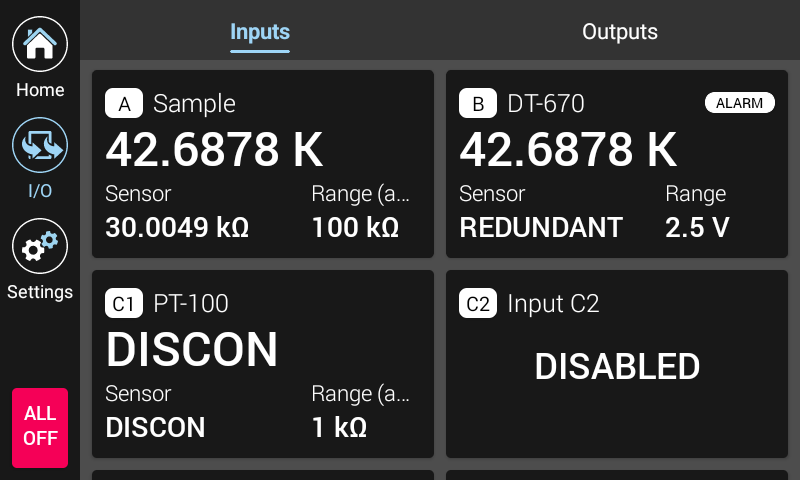
Figure 4.25 Input B has experienced a fault and is redundantly falling back to Input A
Note
Readings generated by redundant fusion are considered Estimated Readings, and follow the remote interface readings mode set forth in ESTMODE. This ensures that remote monitoring software can detect the redundant condition even though the reading provided is non-questionable. Furthermore, if the primary input is earlier in the input order (A, B, C1, C2…), the redundant reading may be off by 1 reading.
Boosted Resolution Accuracy Correction
Boosted Resolution Accuracy Correction fusion is intended for use with two thermally coupled sensors where the primary sensor can be operated with an increased excitation power budget to improve measurement resolution. The Model 346 characterizes the sensor pair at a stable operating temperature, then uses the characterization result to provide a combined reading for control and monitoring. This approach enables customers to achieve higher effective temperature resolution without the response-time penalty of heavy filtering, providing both precision and responsiveness in temperature control and monitoring applications.
To enable Boosted Resolution Accuracy Correction, run the characterization
process after the system has reached the intended operating temperature and
the readings have settled. First configure the desired excitation boost level
(+1 through +7) on the primary input with the BOOST
command. The Model 346 will complete the
characterization and store the configuration for subsequent use. Filtering is
automatically disabled while the primary input is operating in boost mode.
Re-characterize the sensor pair if the sensor mounting, wiring, excitation boost, thermal environment, or operating temperature range changes.
For more information on Boosted Resolution Accuracy Correction, see Boosted Resolution.
Interface Commands: FUSION, BOOST, BOOST?, BOOSTCHAR, BOOSTCHAR?, BOOSTCHARRES?, BOOSTCHARRESCLR, BOOSTCHARCANCEL, BOOSTCHARDFLT, BOOSTCHARDFLT?, BOOSTCHARSHOFFSET?