4.8. Relays
There are two relays on the Model 346 numbered 1 and 2. They are commonly paired with input alarms, but can be paired with many other features that allow for system process control.
Interface Command: RELAY
Note
The relays are rated for 30 VDC and 2 A.
While it is recommended to use ColdSync™, Relays can be set up from the front panel by tapping Settings on the Navigation panel, then tapping the Relays button.
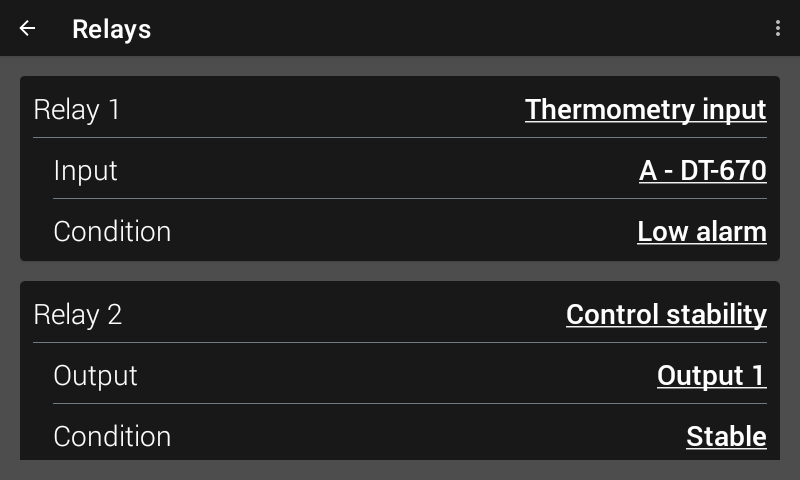
Figure 4.16 Relay settings screen
For each Relay, a Feature can be selected. The available Features are:
Off
On
Thermometry input
Control stability
Digital input
System
The following sections describe each of the available Relay features.
Off / on
When the Off feature is selected, the relay is un-energized, causing the normally open (NO) contacts to open and the normally closed (NC) contacts to close. When the On feature is selected, the relay is energized, so the NO contacts will close and the NC contacts will open.
Thermometry input
When set to the Thermometry input feature, the relay will activate based on the state of the configured Input sensor. The following sections describe the selectable Conditions available once the Thermometry input feature has been selected.
Alarm
The first four available Conditions available are alarm related. When using relays with alarm operation, before selecting the desired Input, set up alarms first.
Select from the following available alarm Conditions:
Low alarm: The relay energizes if the Input alarm goes into a low alarm state
High alarm: The relay energizes if the Input alarm goes into a high alarm state
Either alarm: The relay energizes if the Input alarm goes into either a low alarm or a high alarm state.
Both alarms: The relay energizes if the Input alarm goes into both a low and high alarm state. This can be achieved by setting the High setpoint with a lower temperature value than the Low setpoint. This allows the relay to energize when a temperature is inside a defined span.
Thresholds
The Threshold feature allows monitoring of up to four independent temperature thresholds per input. When the input reading crosses a threshold based on the configured comparison operator, either greater than or less than, the relay energizes. The Model 346 has 4 settable thresholds per input. Only one is selectable at a time for relay operation.
If a curve is assigned to the input, the threshold value is interpreted in Temperature units. If no curve is assigned, the value is in sensor units.
Thresholds are useful for monitoring temperature points without requiring alarm functionality, and can be used for process control or data logging triggers.
Select from the following available Threshold-related Conditions:
Threshold 1
Threshold 2
Threshold 3
Threshold 4
Note
Thresholds are only configurable over the remote interface using the THRESHOLD command.
Questionable readings
The following Conditions are available to energize the relay should the input reading become questionable.
Sensor fault: The relay will energize if the Input sensor reading goes over / under full scale sensor units (S. OVER / S. UNDER)
Temperature fault: The relay will energize if the Input reading goes over / under the ends of the curve (T. OVER / T. UNDER)
Extrapolated: The relay will energize if the Input readings is in an extrapolated region of the curve.
Control stability
When set to the Control stability feature, the relay will activate based on the state of the configured output / control loop.
Once the Control stability feature is selected, and the associated Output is selected, the following Conditions are available to choose from:
Load fault: The output has shut off due to detecting either an open or short load.
Ramp done: Setpoint ramping is enabled, and the setpoint ramp has reached its destination and the ramp is complete.
Stabilizing: The Control stability feature is enabled and the stability status is currently Stabilizing.
Stable: The Control stability feature is enabled and the stability status is currently Stable.
Warm: The warm-up mode has completed and the individual output is in a warm state.
Digital Inputs
The Model 346 has two digital inputs. Relays can be configured to energize based on the state of a digital input.
Once the Digital input feature is selected, select the associated Digital input and then the desired Condition:
Low: The relay will energize when the digital input is logic low.
High: The relay will energize when the digital input is logic high.
System
The System feature allows the relay to energize based on the state of the system. The following Conditions are available for selection:
All warm: The relay will energize when the warm-up mode has completed and all outputs associated with warm-up have reached the warm state.