4.5. Control Stability
When automating an experiment with multiple temperature steps, it is useful to know when the temperature of the sample has stabilized and is ready for measurement. It is important to not only wait for the temperature of the stage to stabilize, but also to wait a sufficient amount of time to allow the sample to reach this temperature as well. The Model 346 Control stability feature will report when the temperature of the stage has stabilized. In order to do so, the following parameters must be configured:
Setpoint
Acceptable error
Settle time
Theory
Before explaining how to set up the Control stability feature, a brief explanation of how it works is warranted.
When the Control stability feature is enabled for an output, the Model 346 monitors the oscillation of a Input control temperature reading above and below the Setpoint. It then determines if the variation of the temperature reading is within acceptable bounds. The user provides an Acceptable error in which the reading must oscillate within, along with a Settle time component, to ensure that the reading does not drift out of the Control stability range.
Note
The output must be paired with an input to form a control loop in order to use the Control stability feature. The output must also be configured in Closed loop or Zone mode.
The Model 346 requires at least one minimum reading below the setpoint and one maximum reading above the setpoint, both within the Acceptable error limit, to enter into the Stabilizing state. Once in the Stabilizing state, the input temperature readings must remain within the Acceptable error limit for the Settle time to be considered Stable.
The following figure illustrates how the feature works.
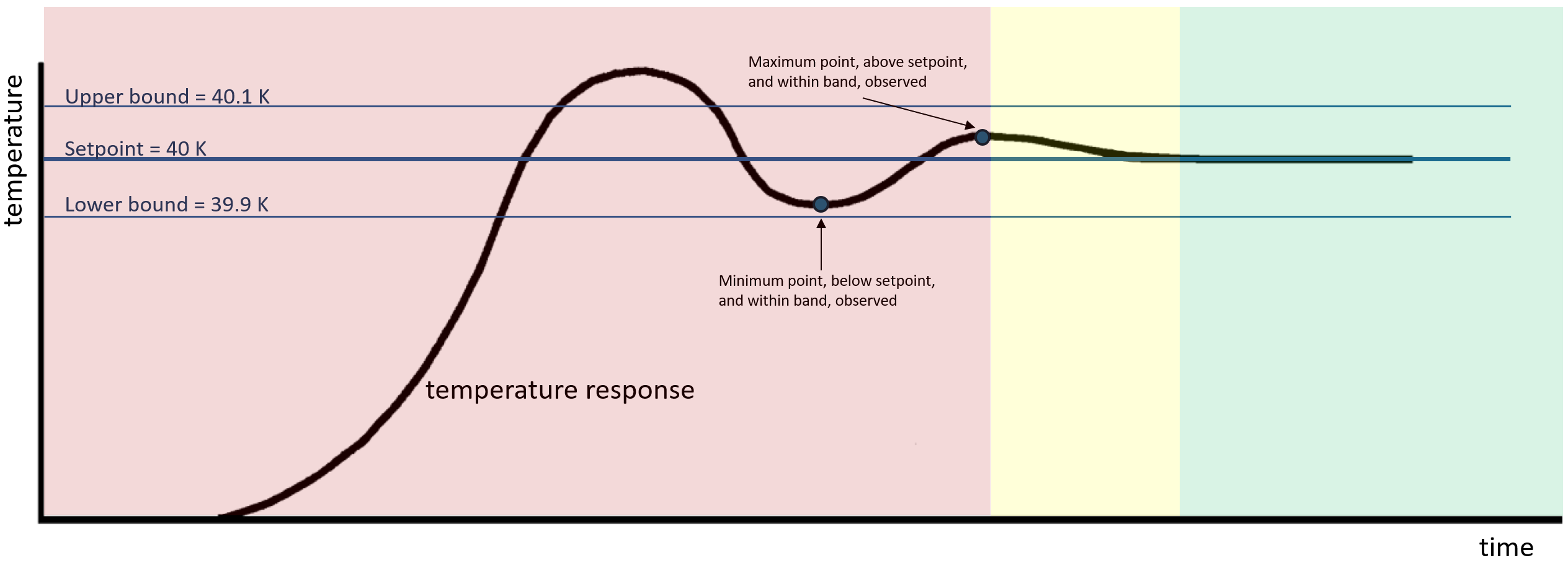
Figure 4.8 Control stability diagram
In the example above, the Acceptable error is set to 100 mK. With a setpoint of 40 K, this results in an error band 39.9 K to 40.1 K.
The red-shaded area represents a non-stable state. Once the minimum and maximum readings have been observed within the error band, the Control stability state changes to Stabilizing, and the Settle time timer starts counting down. The Stabilizing state is represented by the yellow-shaded area. If the temperature reading continues to remain within the error band for the duration of Settle time, the Control stability state changes to Stable, which is represented by the green-shaded area. The state will remain Stable as long as the temperature reading remains within the error band. If the reading drifts outside of the error band, the state will change back to non-stable and the process will repeat.
Setup
Navigate to the output setup page to configure Control stability settings. Tap Control stability to enable and disable the feature
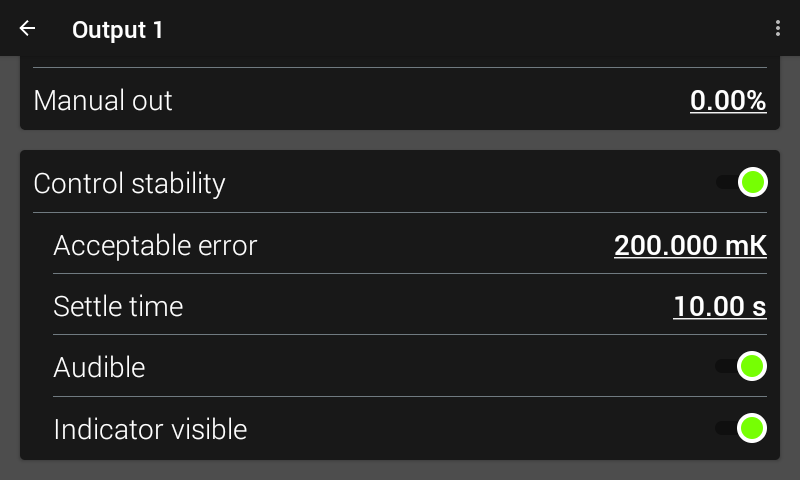
Figure 4.9 Control stability setup screen
Acceptable error and Settle time are discussed above. Enable Audible to have the Model 346 emit a tone when the Stable state is reached. If Audible is enabled and the Model 346 starts annunciating, a pop-up will appear allowing you to silence the tone. If the input reading drifts out of band but comes back to the stable state, the Model 346 will annunciate again.
Enable Indicator Visible to allow the front panel to display indicators of when the Stabilizing and Stable states are reached.
Interface Command: OUTSTABLE, OUTOPR?