4.11. Programs
The Model 346 implements a program subsystem that allows users to create, store, and run predefined SCPI strings on the instrument. Programs are used to automate sequences of commands by attaching those sequences to functions, which monitor system events within the Model 346.
Interface Command: PROGDEF, PROGEXE, PROGCAT, PROGDEL
Programs are designed to work with ColdSync™ or the Lake Shore Python driver, due to their complexity and syntax discussed further in the Remote Operation section. Up to 16 programs can be stored on the instrument at a time, with each program identified by a unique name used by the Model 346. While programs can be executed directly using the PROGEXE command or from the front panel as pictured below, more powerful system automation can be accomplished with the functions subsystem, described in the following section.
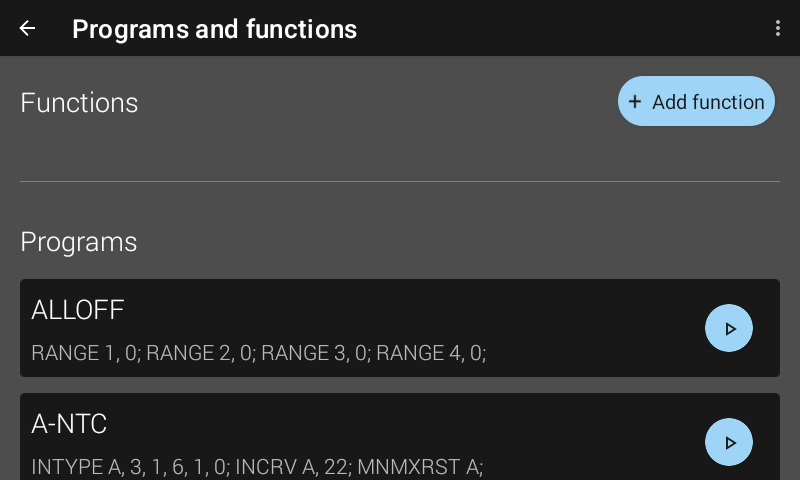
Figure 4.24 The programs menu with two shown programs, ALLOFF and A-NTC
Functions
Functions leverage the syntax used in the Relay subsystem to combine multiple conditions into boolean expressions that can execute programs. Each function consists of two arguments represented by a Relay condition, a boolean operator to combine them, and an optional program output that is executed when the boolean expression changes from false to true. Functions are not required to have an associated program output, and can instead exist as inputs to other functions, or simply to provide information to the remote interface. Functions can be configured either from ColdSync™ or the Lake Shore Python driver like programs, however they can also be configured directly from the instrument’s front panel as pictured in the figure above.
Practical Examples
Due to the broad number of possibilities for combining conditions and executing programs, below are some basic examples to demonstrate their usage.
Example 1: Fail high Analog Output
Suppose there is a system with a number of sensors monitoring a superconducting magnet. If any of the sensors measure a value that exceeds the critical point or if a questionable reading is detected, a program is triggered to set the Analog Output to 10 V to disable the magnet power supply. The program definition below accomplishes the intended behavior turning the output on in manual output mode, configuring the manual output percentage to 100%, and then enabling the output.
Interface Command: PROGDEF “PANIC”, #250OUTMODE 5, 3, NONE, 0, 0; MOUT 5, 100; RANGE 5, 1;
To trigger this program, a series of functions must be enabled to monitor sensor faults and temperature thresholds
Interface Command: FUNC 1, 2, A, 4, OR, 2, A, 5, 0, 0Interface Command: FUNC 2, 2, B, 4, OR, 2, B, 5, 0, 0Interface Command: FUNC 3, 2, A, 0, OR, 2, B, 0, 0, 0Interface Command: FUNC 4, 6, 1, 1, OR, 6, 2, 1, 0, 0Interface Command: FUNC 5, 6, 3, 1, OR, 6, 4, 1, 1, “PANIC”
Functions 1 and 2 monitor for sensor and temperature faults on both A and B respectively, while function 3 monitors threshold 0 on both A and B. Functions 4 and 5 combine the previous functions using boolean operators to trigger the “PANIC” program whenever any of the aformentioned conditions are met.
Example 2: Heat cycling
Suppose you want to perform a heat cycling operation where the system alternates between warming and cooling a sample. You can define two programs, “WARMUP” and “COOLDOWN”, to control the cryocooler (relay) and setpoint settings accordingly to alternate between a high and low temperature. First we define the two thresholds on input A, one for greater than 50K, and one for less than 10K.
Interface Command: THRESHOLD A, 0, 50, 1;Interface Command: THRESHOLD A, 1, 10, 0;
Then we define the programs, which disable the relays, set the appropriate heater range, and configure the ramp rate and setpoint for warming up and cooling down the sample.
Interface Command: PROGDEF “WARMUP”, #257RELAY 1, 0, 0, 0; RANGE 1, 2; RAMP 1, 1, 5.0; SETP 1, 55;Interface Command: PROGDEF “COOLDOWN”, #256RELAY 1, 1, 0, 0; RANGE 1, 0; RAMP 1, 0, 0; SETP 1, 10;
Finally we define two functions to trigger the programs when the thresholds are met.
Interface Command: FUNC 1, 2, A, 0, OR, 0, 0, 0, 1, “COOLDOWN”;Interface Command: FUNC 2, 2, A, 1, OR, 0, 0, 0, 1, “WARMUP”;