7.6. Firmware Updates
Overview
The Model 346 can update its firmware manually by attaching a USB Type-C™ stick to the rear panel, or by downloading and installing updates from Lake Shore with a Model 346 source connected to the internet.
Model 346 firmware comprises many files, aggregated together to form a Lake Shore Firmware (LSFW) package. The Model 346 stores versions of its LSFW packages in its internal memory. This local memory location is called the “local repository”. This allows you to downgrade firmware should you choose, since older versions will still remain on the Model 346 in the local repository. In addition, Lake Shore maintains LSFW packages on a network server that allows us to deploy those packages to all Model 346 customers. This is called the “remote repository”.
Firmware update information can be found via the Model 346 front panel by tapping the Settings button, then tapping the Updates button. If a valid internet connection is present, the Model 346 will automatically check the remote repository for updates and display information about the latest available firmware.
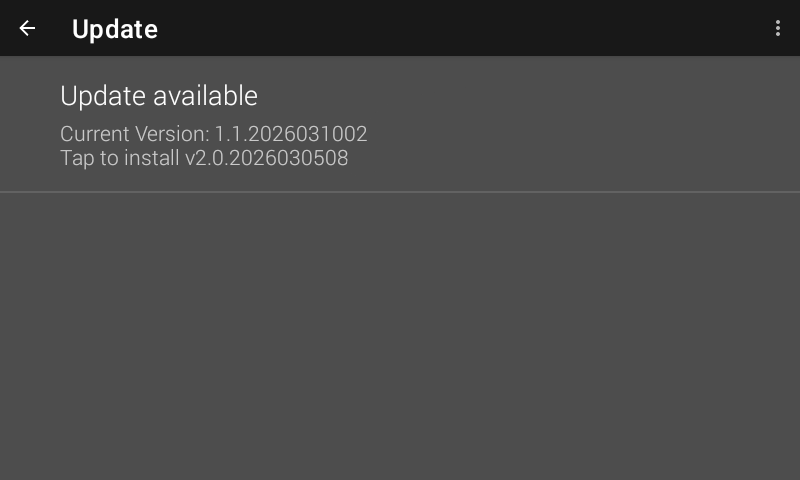
Figure 7.9 Firmware updates: notification
If the Model 346 notifies you that a firmware update is available, tap Update available. You’ll then be presented with a notification, prompting you to install. Click Install and follow the on screen instructions.
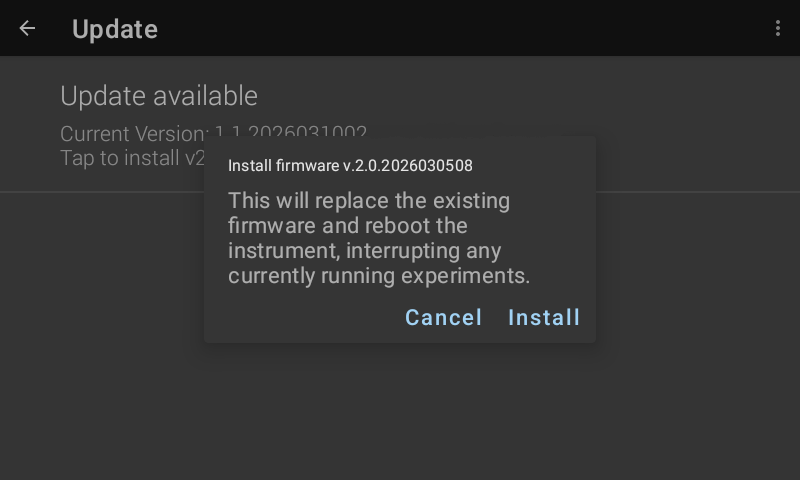
Figure 7.10 Firmware update
Manual Update Procedure using USB Type-C™
The Model 346 firmware can be downloaded from the Lake Shore website and manually installed on the Model 346 using a USB Type-C™ stick:
To download the firmware, go to the Downloads tab at https://www.lakeshore.com/346/, then, under the “Software/Firmware” section, select “346 firmware update”
Insert the USB stick into your computer and copy the downloaded Model 346 LSFW package to the root directory of the USB stick.
Remove the stick from the computer and insert it into the USB Type-C™ port of the Model 346.
On the Model 346 front panel by tap the Settings button, then tap the Updates button.
Tap Update available and follow the on-screen instructions to update the firmware.
Note
A FAT-32 formatted USB stick is required for this procedure.