5.3. Ethernet Interface
The Ethernet interface provides a means of connecting the Model 346 to an Ethernet-based computer network. These networks provide the ability to communicate across large distances, often using existing equipment (the internet, pre-existing local networks). The Ethernet interface of the Model 346 provides the following capabilities:
Send remote interface commands via TCP socket
Firmware updates
Network Configuration
Configuration and status for these network configurations can be found from the front panel by tapping the Settings button located on the Navigation panel, tapping the Connectivity card.
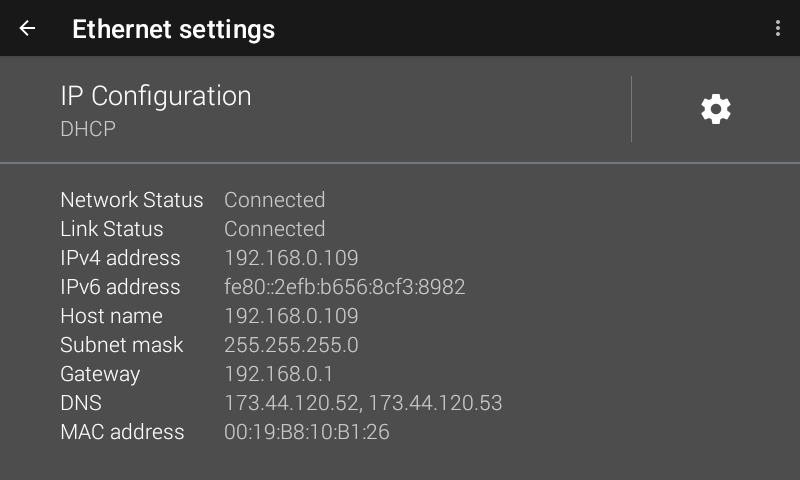
Figure 5.1 Ethernet settings
Network address parameters include the IP address, the subnet mask, gateway address, and DNS address.
IP address: an IP address is required for a device to communicate using TCP/IP, which is the protocol generally used for Ethernet devices and the Model 346. The Model 346 supports both IPv4 and IPv6.
An IP address is a 32-bit (IPv4) or 128-bit (IPv6) logical address used to differentiate devices on a network. It is most often given in dotted decimal notation, such as nnn.nnn.nnn.nnn (IPv4) or nnnn:nnnn:nnnn:nnnn:nnnn:nnnn:nnnn:nnnn (IPv6). The Model 346 supports a dual stack TCP/IP architecture, meaning it can be assigned both IPv6 and IPv4 addresses at the same time. IPv6 addresses are automatically configured.
IPv6 Link Local and DHCP: IPv6 will always have a link local address assigned, and additionally can have an assigned DHCP address. IPv6 link local is derived from its globally unique MAC address and is automatically assigned on power up. This differs from IPv4, where a link local address is only assigned after a node fails to get an address via DHCP. The IPv6 DHCP address is automatically configured when the Model 336 is connected to an IPv6 compatible router or network, similar to IPv4 DHCP.
Subnet mask (IPv4): a sub network, or subnet, is a group of devices within a network that have a common, designated IP address routing prefix. A subnet mask is a 32-bit “bit mask” that signifies which part of the IP address represents the subnet routing prefix, and which part represents the device’s address on the subnet. A subnet mask is most often given in dotted decimal notation, such as nnn.nnn.nnn.nnn where nnn is a decimal number from 0 to 255. When converted to a binary notation, the 32-bit subnet mask should consist of a contiguous group of ones, followed by a contiguous group of zeros. The ones represent which bits in the IP address refer to the subnet, and the zeros represent which bits refer to the device address. For example, the default static IP address of the Model 346 is 192.168.0.128, and the default static subnet mask is 255.255.255.0. Converting this subnet mask to binary shows that the first 24 bits are ones, and the last 8 bits are zeros. This means that the first 24 bits of the static IP address (192.168.0) represent the subnet, and the last 8 bits (12) represent the device.
Gateway address (IPv4): a gateway is a network traffic routing device that is used to route communication between networks. If a gateway is not used, then devices on a network can only communicate with other devices on that same network. A gateway address is the IP address of the gateway on a network. Contact the network administrator for the gateway address for your network.
DNS address: a domain name system (DNS) is a service that translates names into IP addresses. This service allows for using human readable names for devices on a network. As an example, when a web browser attempts to retrieve the web page at www.lakeshore.com, the browser first performs a forward-lookup on the assigned DNS server to attempt to retrieve the IP address that is represented by the name www.lakeshore.com. If successful, the web browser then uses the retrieved IP address to communicate with the web server that hosts the website at www.lakeshore.com.
Network Address Configuration Methods
The network address parameters of the Model 346 can be configured using one of two methods: DHCP or static IP. DHCP is an automatic configuration method while static IP requires manual configuration. If supported by the server, DHCP can also be used to automatically configure DNS server addresses, as well as IP address parameters.
Dynamic host configuration protocol (DHCP): DHCP is a method of automatically configuring the IP address, subnet mask, and gateway of Ethernet devices on a network. This method provides simple automatic configuration for users connecting to a network that provides a DHCP server. The network DHCP server will provide an IP address, subnet mask, and gateway address. Depending on the DHCP server configuration, it may also provide primary DNS and secondary DNS addresses as well. DHCP is the simplest method of IP configuration. DHCP does have the disadvantage of not necessarily preserving the IP address through a device reconfiguration, as well as the possibility of being automatically reconfigured when the DHCP “lease” expires. Contact your network administrator to find out the DHCP lease policy on your network.
Static IP: static IP is a method of manually configuring the IP address, subnet mask, and gateway of network enabled devices. When using the static IP method, the IP address, subnet mask, and gateway must be configured appropriately for the connected network, or for the connected PC, in order to establish connection to the network. A major advantage to the static IP method is that the IP address will not change during device reconfiguration (power cycle). Disadvantages of using the static IP method include the requirement of knowing how your network is configured in order to choose the correct configuration parameters.
TCP Socket Communication
A TCP socket connection interface is provided as the communication medium for the network interface of the Model 346. A TCP socket connection, or simply “socket connection,” is a common connection protocol used by Ethernet devices. The transmission control protocol (TCP) is commonly used for creating a communication channel between one program on one computer and one program on another computer; for example, a web browser on a PC and a web server on the Internet. In the case of the Model 346, the protocol is used to create a communication channel between one program on one computer and the command line interface of the Model 346. TCP uses error correction and collision avoidance schemes that make it a very reliable form of network communication, but has drawbacks of having nondeterministic timing and can encounter relatively large delays, depending on network conditions. These delays can be on the order of seconds. Sockets use port numbers to identify sending and receiving endpoints on network devices. This allows for multiple separate communication links to exist on each device.
Note
The port number used for TCP socket connections on the Model 346 is 7777 by default. The port number can be configured from the Connectivity screen in System settings (top left corner of the screen).
Note
A maximum of five simultaneous socket connections can be made to the Model 346. Any attempts to open a new socket while five socket connections are already open on a Model 346 will fail.
SCPI over TCP
There may be scenarios where the user desires to have the Model 346 connected to the internet but does not want anyone to be able to connect to the Model 346 and start controlling it. The SCPI over TCP setting allows for this. If the setting is disabled then network connections are still allowed, allowing firmware or autodate time to still function. For example, remote control of the Model 346 will not be allowed even if another user knows the IP address and socket of the Model 346.
In order to issue SCPI commands over TCP and remotely control the instrument, this setting needs to be enabled. This can be done by touching the switch, as shown below.
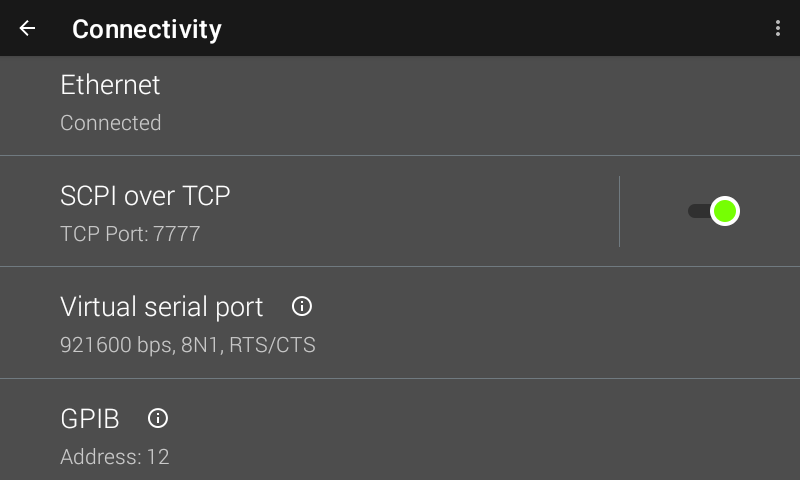
Figure 5.2 SCPI over TCP